Free software to convert between XPS and PDF files
Free XPS to PDF Converter allows users to select between these two file types and to transform one into the other. This actually makes a great deal of sense, as XPS files are essentially the Microsoft version of PDF documents. Such free PDF tools online can be used in schools, businesses and any other type of situation when a universal converter is needed.
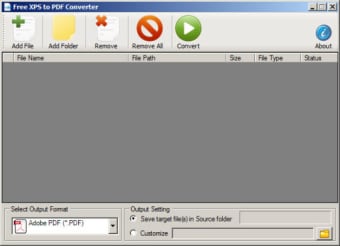
Unlike some other packages, Free XPS to PDF Converter can modify files in either direction. It is therefore able to modify a PDF file in order to suit the requirements of a Windows-based text editor such as Office. It is possible to convert one file at a time or to choose a batch conversion if necessary. Entire file folders can be added into the queue and one-touch conversions allow for a quick and streamlined output. The quality of either output file will normally not be affected.
Additional Uses
Free XPS to PDF Converter is an extremely lightweight bundle. It is only 10.88 megabytes, so it can be a welcome alternative for those who might not have a great deal of available memory. It is intended to be used with all Windows XP operating systems. There is no charge to install this converter.
Kristina Schulz
Kristina has professional experience in Europe, the United States, and Asia, specializing in communication and languages. She values adaptability in multicultural settings and brings this perspective to her writing. Her content reflects clarity, cross-cultural awareness, and practical expertise in connecting ideas through language.
Pros
This software package is free to download.
It can also convert PDF documents into the standard Windows XPS format.
Cons
It is not able to work with newer versions of Windows.
There can be times when high-quality PDF documents do not accurately reproduce.
This is the best software to convert xps to pdf and pdf to xps absolutely free. PDF files are a standard file type in the computing world. This also holds true for XPS files which is very similar to PDF. XPS files were created by Microsoft as a PDF alternative where XPS stands for XML Paper Specification. Because each type of business or school uses different file types, it is essential that these file types can be converted from either xps to pdf or pdf to xps. Free XPS to PDF Converter is a 100% free file converting tool that can handle single or batch file conversions. Users are encouraged to add multiple xps or pdf files so that the converting process is quick and easy.
Free XPS to PDF Converter is a lightweight simple and fast file converting software. There is virtually no loss in quality when converting from either xps to pdf or pdf to xps. The best part about this software is it is completely free. It also takes very little hard disk space for the installation as well as very minimum requirements for the software to run.
Any user can use Free XPS to PDF Converter. With the simple user-friendly interface, anyone with very little skill can navigate this software.
I saw my friend using this software to convert all her XPS files and I was immediately encourage and persuaded to download and install this software because I find their user interface very easy to learn and work around that even a computer novice like me will easily adapt to its methods to use.
Anonymous user
If you are looking for a free, functional and efficient file converter then you must consider downloading and installing this Free XPS to PDF Converter software because you can all of the things you are probably looking for the best file converter in this software alone. For me, this is the greatest of all the file converters!
Anonymous user
I really don't mind downloading and installing this software because other than it has a lot of awesome features and handy functions , this bundle is extremely lightweight which can only eat 10.88 MB in my memory space. Plus, it is free of charge. It really is worthy to download and install!
Anonymous user
I really love this Free XPS to PDF Converter software! Most especially their batch conversion feature that truly saved a lot of time rather than converting a file one by one manually. That's why, I will never uninstall this software because it really brings more convenience to my work life.
Anonymous user
Free XPS to PDF Converter is another file converter that is very worthy to have in your computer system! This comes very handy most especially for your schools, businesses and any other situation that might require a quick conversion process. This program will save you when a problem occurs in your file.
Anonymous user
Does the converting part just great. everything works, converted my pdf files quickly with good quality
Laws concerning the use of this software vary from country to country. We do not encourage or condone the use of this program if it is in violation of these laws. Softonic may receive a referral fee if you click or buy any of the products featured here.